StreamOtter v0.2.0-rc.1

Meet the workbench

Open the published StreamOtter workbench in an isolated sandbox when one is available, or follow its Connect, Define, Preview, Inspect, and Export steps in screenshots.

Workbench sandbox

Checking the sandbox…

Asking the field station for the sandbox's status and this browser's session.

Mode
Not reported
Packages
Not reported
Workbench seam
Not reported

A session runs StreamOtter's published @streamotter/workbench@0.2.0-rc.1, served from this site. Its third-party licenses.

A session is never started for you: not when this page opens, reloads, or comes back from your browser's history. Leaving the page returns your slot. A session also ends after a minute without a check-in from this page, which can happen when your browser slows a tab left in the background for several minutes. See the steps in screenshots instead.

What a session opens with

Each sandbox session runs two channels side by side on synthetic fixture sources: the creek's own station channel and the jobProgress channel from the example streamotter init creates. In each, a source record goes in, and the channel's map handler returns the full state that browsers receive.

Design fixture. The records and states below are written into this page; they are not read from a running sandbox. The site's tests check them against their sources: the creek simulation and the field station's map handler, and the pinned streamotter init scaffold and its map handler.

The creek's station channel

From the creek simulation's first tick, mapped by the field station's own Kafka handler.

Design fixture Source record · Kafka topic field.gauges, written by the field station

{
  "topic": "field.gauges",
  "key": "station:LC-03",
  "value": {
    "tenantId": "lontra-creek",
    "channel": "station",
    "params": {
      "stationId": "LC-03"
    },
    "revision": "1000000000001",
    "data": {
      "stationId": "LC-03",
      "name": "Slate Canyon",
      "reachId": "slate-canyon",
      "observed": {
        "day": 1,
        "time": "05:05"
      },
      "stageFt": 3.1,
      "flowCfs": 86.9,
      "waterTempC": 10.3,
      "dissolvedOxygenMgL": 10.5,
      "turbidityNtu": 4,
      "trend": "steady",
      "weather": "clear"
    }
  }
}

Design fixture State the map handler returns · station stationId=LC-03

{
  "tenantId": "lontra-creek",
  "params": {
    "stationId": "LC-03"
  },
  "revision": "1000000000001",
  "data": {
    "stationId": "LC-03",
    "name": "Slate Canyon",
    "reachId": "slate-canyon",
    "observed": {
      "day": 1,
      "time": "05:05"
    },
    "stageFt": 3.1,
    "flowCfs": 86.9,
    "waterTempC": 10.3,
    "dissolvedOxygenMgL": 10.5,
    "turbidityNtu": 4,
    "trend": "steady",
    "weather": "clear"
  }
}
The init example's jobProgress channel

The first jobs fixture record of the streamotter init scaffold this site pins, mapped by that scaffold's handler.

Design fixture Source record · the scaffold's jobs fixture source (a Kafka topic in your app)

{
  "source": "jobs (fixture)",
  "key": "job_1",
  "value": {
    "tenantId": "local",
    "revision": "2",
    "job": {
      "jobId": "job_1",
      "state": "running",
      "percent": 25
    }
  }
}

Design fixture State the map handler returns · jobProgress jobId=job_1

{
  "tenantId": "local",
  "params": {
    "jobId": "job_1"
  },
  "revision": "2",
  "data": {
    "jobId": "job_1",
    "state": "running",
    "percent": 25
  }
}

In your app

The creek and the scaffold are the same shape. Swap the creek's words for your own:

Lontra CreekYour app (the init example)What it is
stationjobProgressOne channel: a named, versioned contract for one kind of live state.
stationId: "LC-03"jobId: "job_1"The parameter that picks one instance. Each instance has its own revisions and access check.
stageFt, flowCfs, trendstate, percentThe full state your map handler returns. Browsers replace it on each revision; they never merge it.
revision 1000000000001revision "2"Orders the states of one instance. Snapshots and mapped records must describe the same progression.
tenantId "lontra-creek"tenantId "local"Whose data it is. A subscriber sees only instances in its own principal's tenant; your authorize handler decides the rest.
topic field.gaugesyour jobs topicWhere the records come from. Your app owns the topic and the record format; the map handler translates.

Step by step

Fallback: screenshots, not a sandbox session. Captured locally on October 5, 2026 with streamotter@0.2.0-rc.1 and Node.js 24.21.0. Capture source: Published npm workbench; CLI-generated fixture project on loopback, Linux. These are real product captures of that version, not the hosted field station or a sandbox. That workbench and its management API exist only in development mode and listen on loopback.

Capture provenance · Run these steps yourself ↗

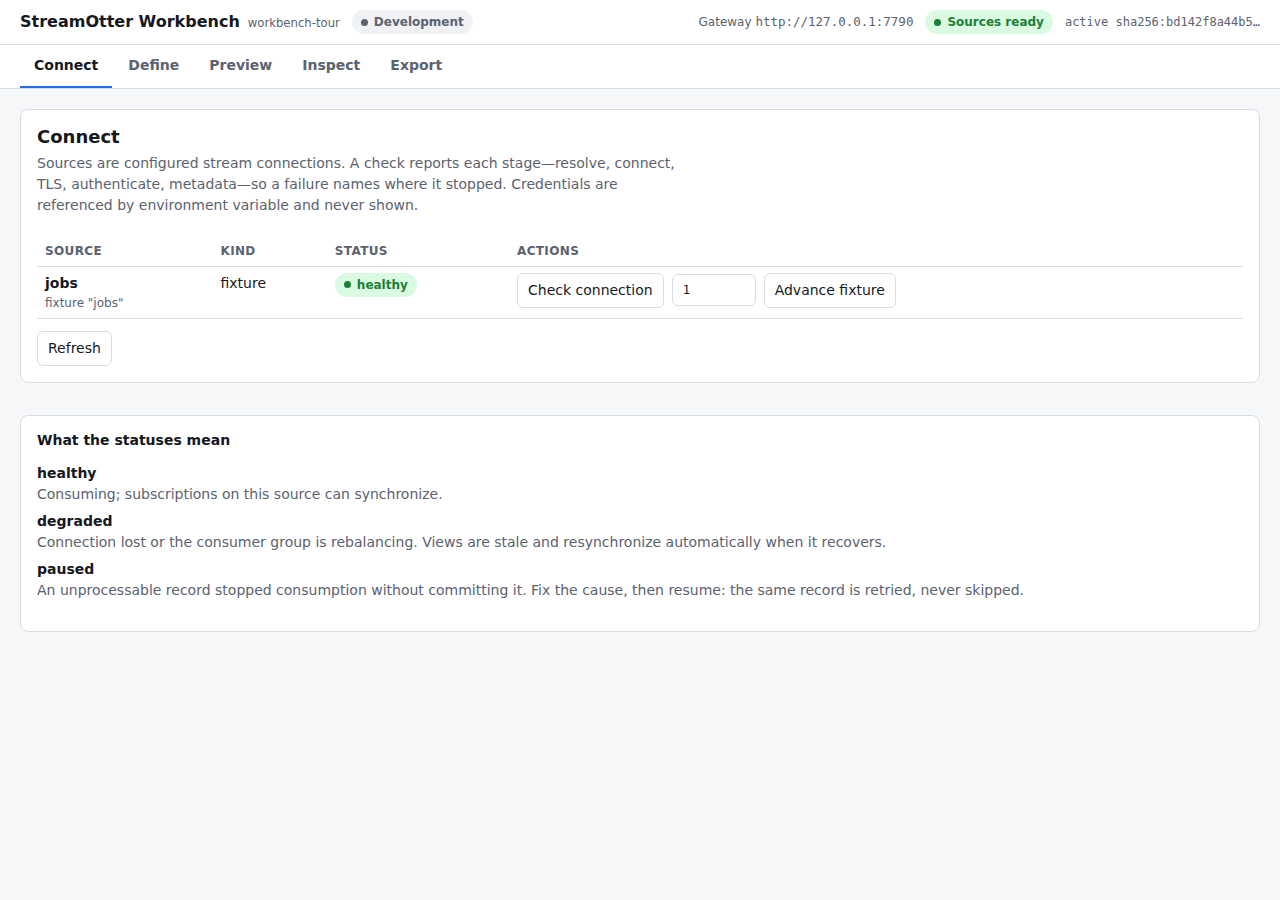
Connect

See source health and staged connection checks. This capture uses the installed CLI’s fixture source; no Kafka broker is involved.

Recorded Connect panel in StreamOtter 0.2.0-rc.1: See source health and staged connection checks. This capture uses the installed CLI’s fixture source; no Kafka broker is involved.
Connect · recorded with streamotter@0.2.0-rc.1 · local fixture capture · October 5, 2026

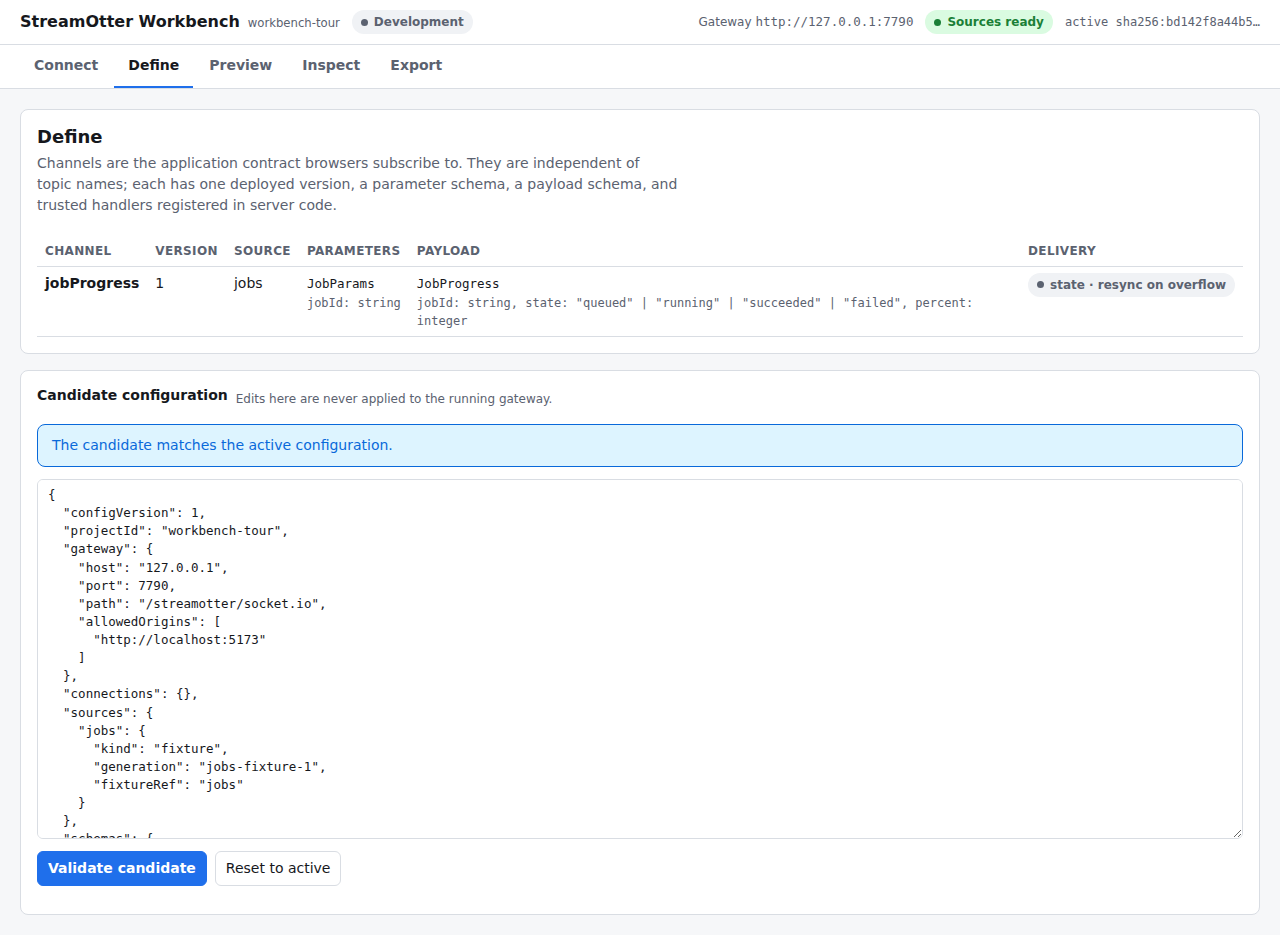
Define

Inspect channel versions, parameters, payload schemas, and delivery. Candidate configuration edits do not change the running gateway.

Recorded Define panel in StreamOtter 0.2.0-rc.1: Inspect channel versions, parameters, payload schemas, and delivery. Candidate configuration edits do not change the running gateway.
Define · recorded with streamotter@0.2.0-rc.1 · local fixture capture · October 5, 2026

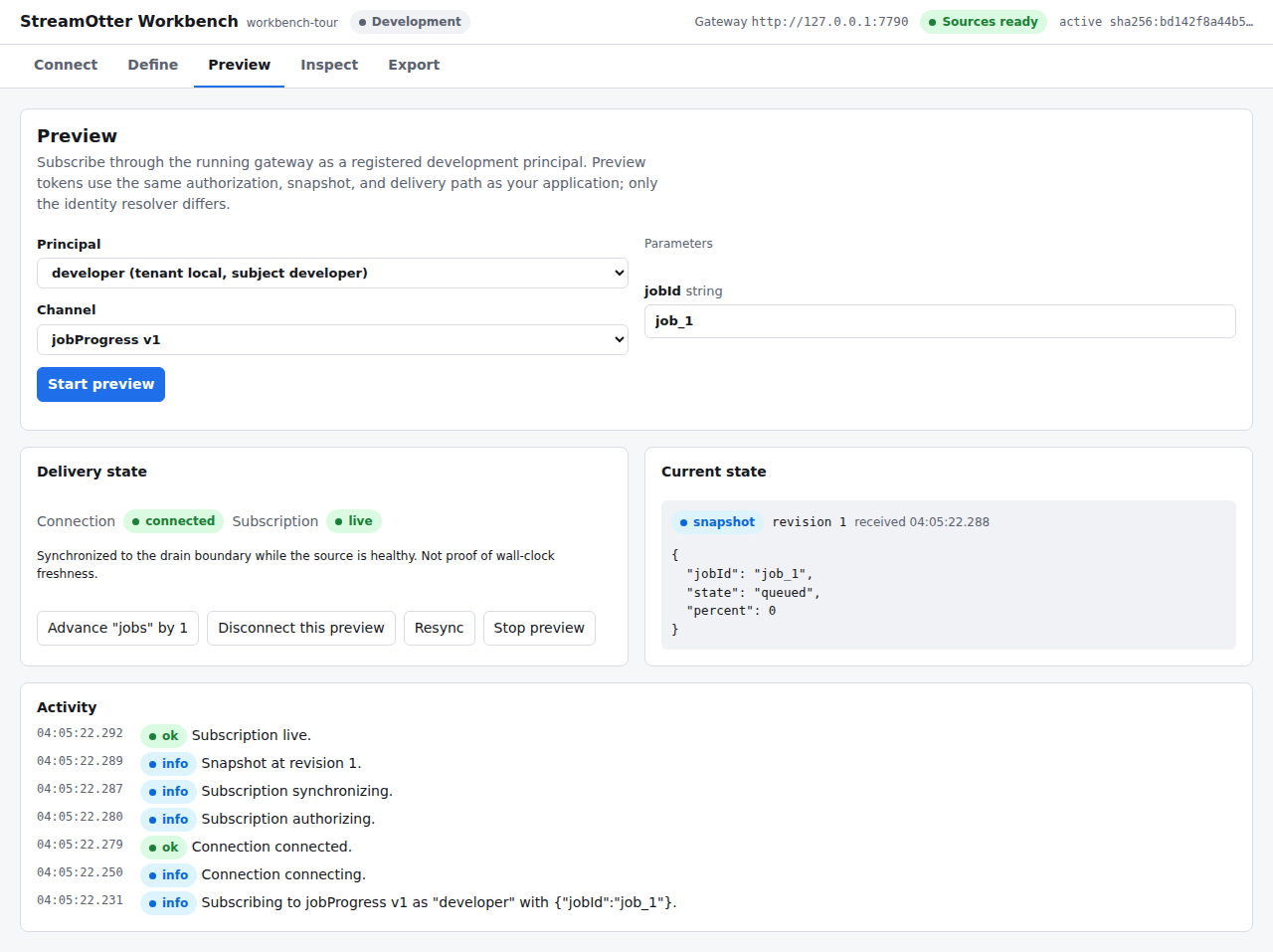
Preview

Subscribe as the development principal to jobProgress with jobId job_1. The real SDK receives snapshot revision 1 and enters live.

Recorded Preview panel in StreamOtter 0.2.0-rc.1: Subscribe as the development principal to jobProgress with jobId job_1. The real SDK receives snapshot revision 1 and enters live.
Preview · recorded with streamotter@0.2.0-rc.1 · local fixture capture · October 5, 2026

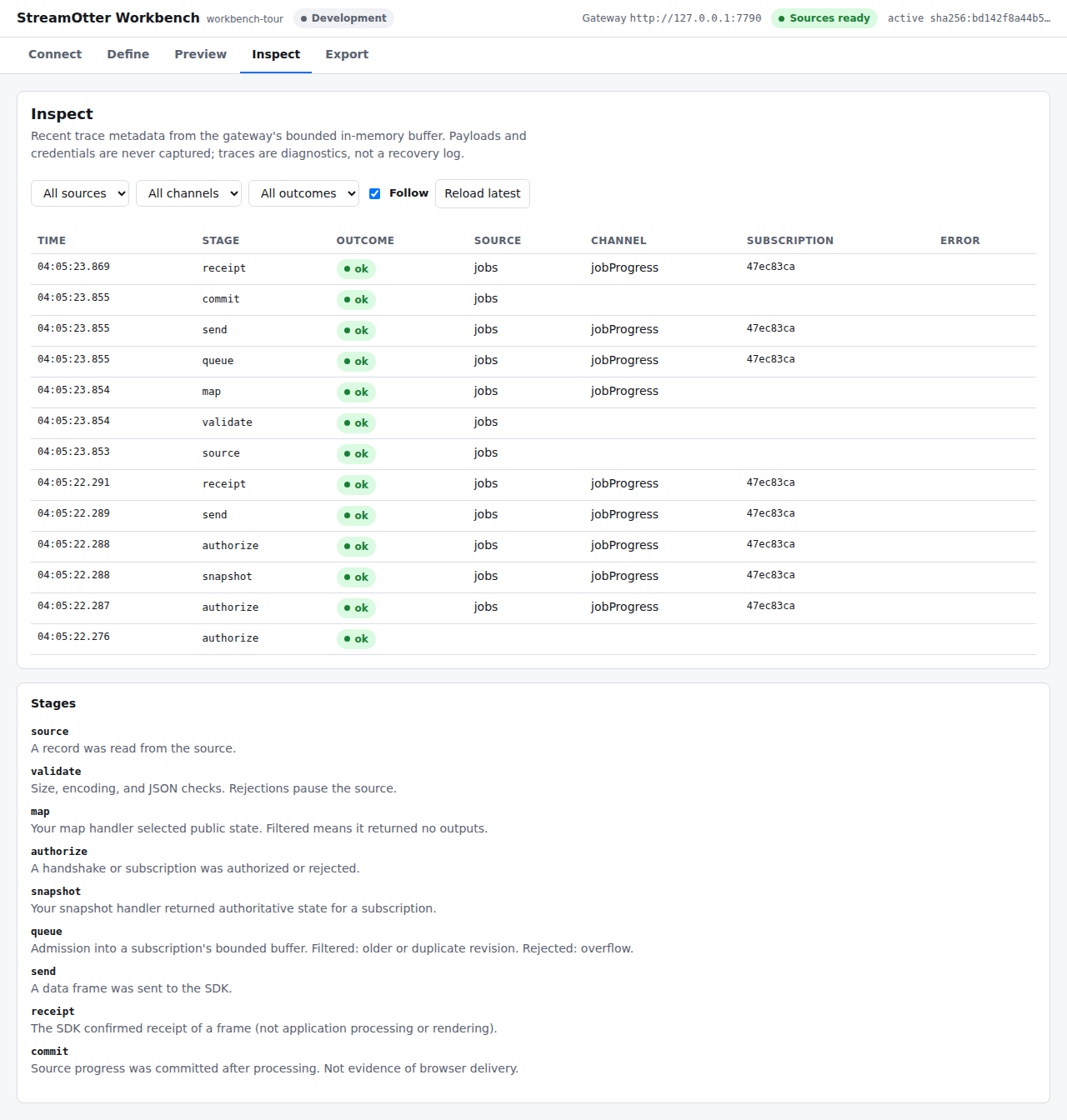
Inspect

After advancing a fixture, follow payload-free metadata through the gateway. A source commit is not evidence of browser delivery; a receipt is not evidence of application rendering.

Recorded Inspect panel in StreamOtter 0.2.0-rc.1: After advancing a fixture, follow payload-free metadata through the gateway. A source commit is not evidence of browser delivery; a receipt is not evidence of application rendering.
Inspect · recorded with streamotter@0.2.0-rc.1 · local fixture capture · October 5, 2026

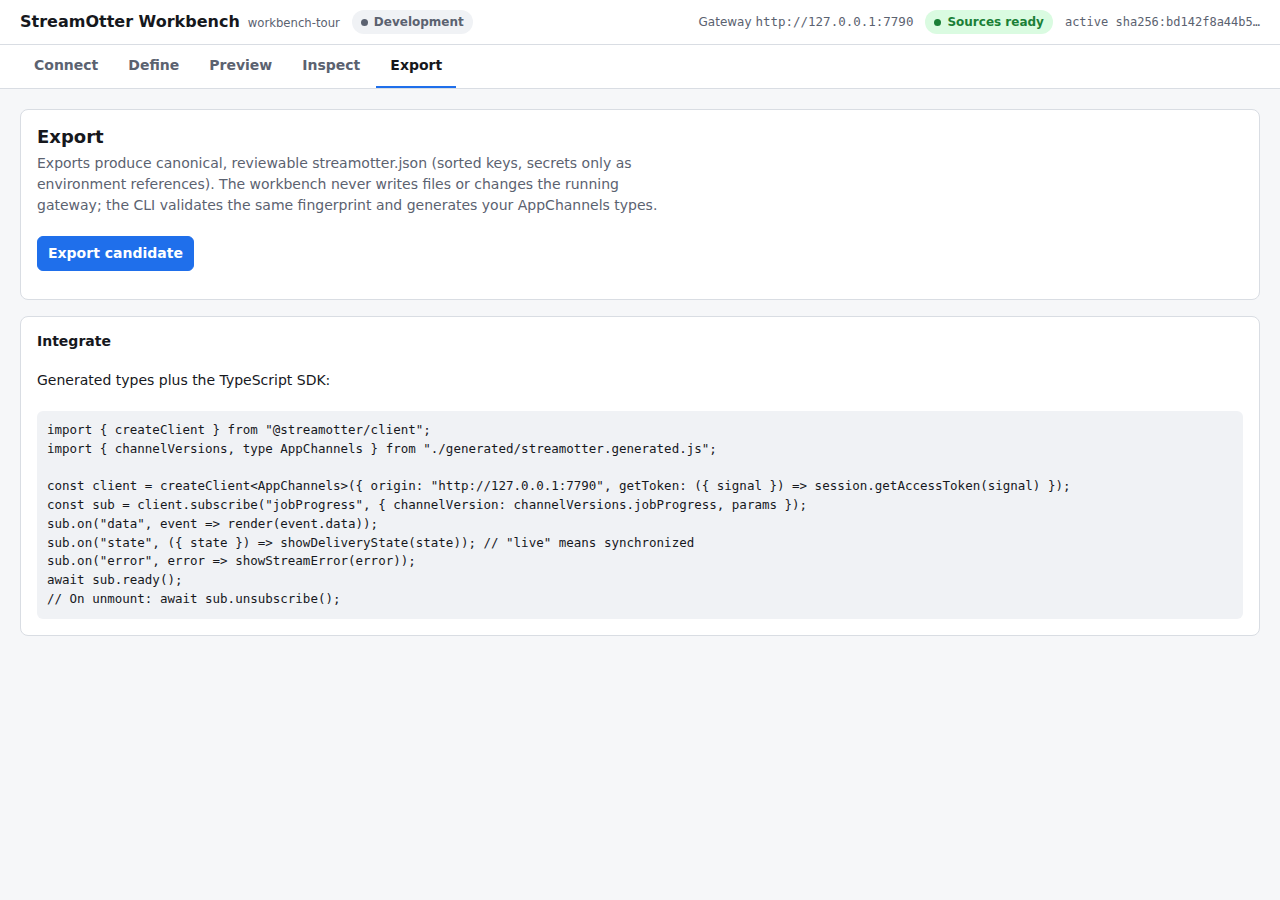
Export

Export canonical configuration for review. The workbench never writes files or changes the running gateway; validate and generate locally before restarting it.

Recorded Export panel in StreamOtter 0.2.0-rc.1: Export canonical configuration for review. The workbench never writes files or changes the running gateway; validate and generate locally before restarting it.
Export · recorded with streamotter@0.2.0-rc.1 · local fixture capture · October 5, 2026

Run it locally

npm install streamotter@0.2.0-rc.1
npx streamotter init .
npx streamotter dev --config streamotter.json \
  --handlers server/handlers.mjs

Open the printed workbench URL and enter its per-run token. The token stays in memory, so reloading asks for it again. Never expose the development workbench publicly.